Home - List of Safety Recommendations
You can access this portal via sris.aviationreporting.eu. This portal is open to everyone.
The home of the SRIS portal displays all the published Safety Recommendations.
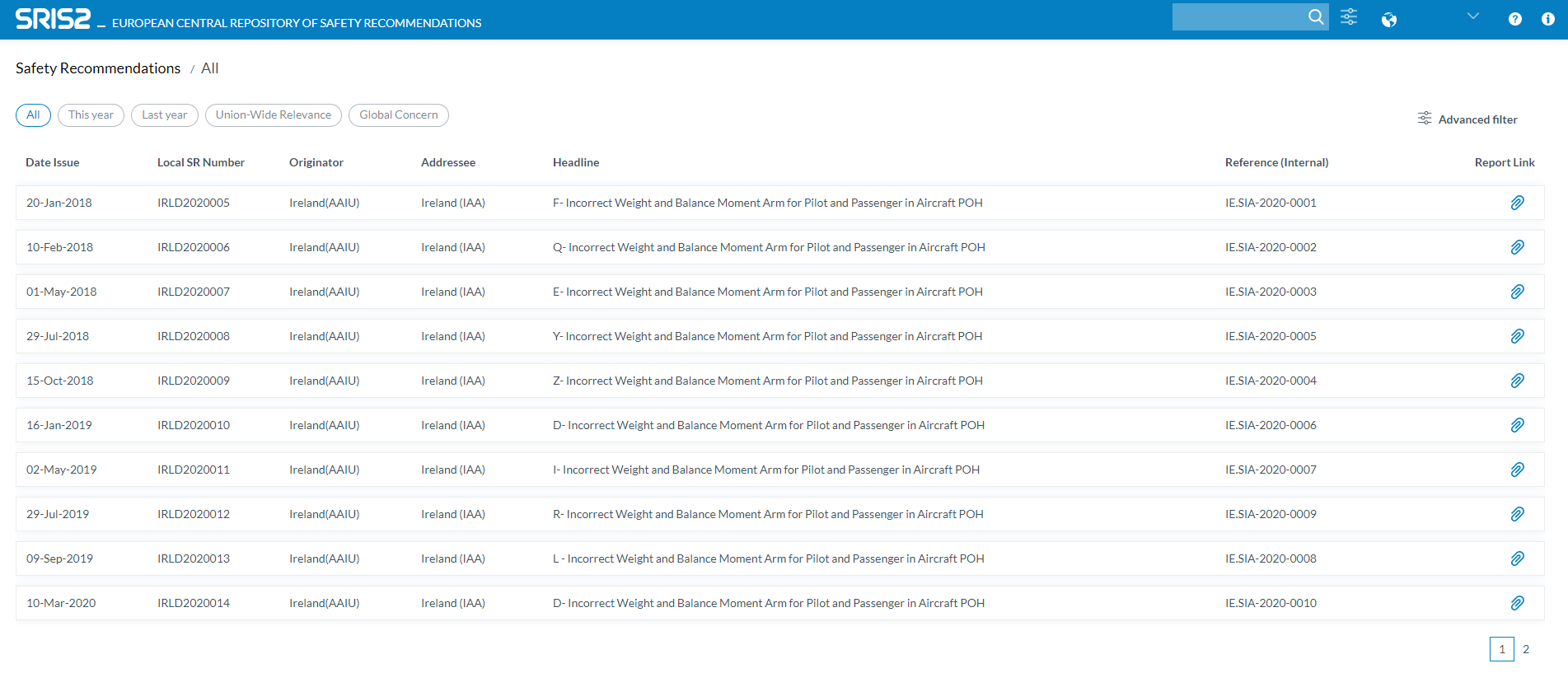
Safety Recommendations List
The Safety Recommendations List is displayed on the center of the page ordered by Date issued, from most recent to the oldest ones. By clicking on each column the table is reordered ascending by the column name. By clicking a second time the table is reordered again but in descending order. An 'arrow' icon should be displayed on the column so you can see the ordering of the table.
Only 10 Safety Recommendations will be displayed per page by default but you can change to 25 or 50. Additionally you can navigate through the pagination.
The information displayed in the table is this:
-
Date issued
-
Local SR number
-
Originator
-
Addressee
-
Headline
-
Reference (Internal)
-
Report Link. It will open the report link in a new window
If you want to review a Safety Recommendation in detail, you can click on one and you will be redirected to the detail view of that Safety Recommendation
Quick filters and Search
Quick Filters
By default, all the Safety Recommendations are displayed. Other filters might be applied throught the following buttons

-
This year: Displays the Safety Recommendations issued this year
-
Last year: Displays the Safety Recommendations issued last year
-
Union-wide Relevance: By clicking on this filter, only the Safety Recommendations that have the "Union-wide Relevance (SRUR)" field checked will be displayed in the list view.
-
Global Concern: By clicking on this filter, only the Safety Recommendations that have the "Union-wide Relevance (SRGC)" field checked will be displayed in the list view.
Search
At the top of the page, there is a  'Search' field. By writing something here and clicking on the search icon, the text written in the search field will be used as a filter. In the Safety Recommendations list view, only the Safety Recommendations that have that text in any of their attributes will be displayed.
Advanced filters
By clicking on the  'Advanced Filters' button, a new section is open to search by other fileds:

- Date issued: To filter by Date issued attribute. You can select a range of dates to be applied by using the two available fields.
- Originator Equal to: You can select one Originator from the list.
- Headline Contains: The text written here will be used to filter the Safety Recommendations by searching this text in the Headline attribute.
- Addressee Equal to: You can select one Addressee from the list.
- Addressee text Contains: The text written here will be used to filter the Safety Recommendations by searching this text in the Addressee attribute. The Addressee should contain the text written here. Please be aware that what is written here could collide with what was selected in 'Addressee Equal to' so be sure to use only one of those two filters or to use both at the same time but with related values.
- Original text Contains: The text written here will be used to filter the Safety Recommendations by searching this text in the Original text attribute. The Original text should contain the text written here.
- English text Contains: The text written here will be used to filter the Safety Recommendations by searching this text in the English text attribute. The English text should contain the text written here.
- SR Topic Equal to: You can select one SR Topic from the list.